

Tablet brand isn't what makes a dispensary POS reliable or compliant. Ask a general retailer whether they run checkout on an iPad or an Android tablet, and many won't have a strong opinion – because for coffee shops and clothing stores, the hardware is largely interchangeable. Cannabis retail doesn't get that luxury. A licensed dispensary is bound by purchase limits, ID verification rules, and state-mandated traceability reporting that most general retail apps were never built to handle.
So when cannabis retail operators ask whether an iPad can run their POS, the real question is whether the software on it can keep the store compliant, fast, and audit-ready. This article covers what you should verify before choosing an iPad POS, how iPad compares to Android for cannabis retail, and what you need to know if you already own iPad hardware and don't want to replace it.
Key Takeaways
- An iPad can run a dispensary POS, but only cannabis-specific software provides the compliance controls your store needs; general retail apps like Square or Clover won't cut it.
- The deciding factors are traceability integration, ID and purchase-limit controls, offline reliability, peripheral support, and integrated payments – not the tablet brand.
- iPad and Android are both viable platforms; the right choice depends on your existing hardware, budget, and how you manage devices across your store.
- Whether you use iPads, Samsung Galaxies, or another brand, a tablet-based POS gives your staff the flexibility to serve customers throughout the store, while a Mac or PC-based POS typically remains stationed at the checkout counter.
- Retailers switching POS systems can often keep the iPad or Android hardware they already own, which lowers the cost of migration.
Can You Run a Dispensary POS on an iPad?
Yes, an iPad can run a dispensary POS, but the tablet is only the delivery mechanism. Compliance comes from the software running on it, not the device itself.
General retail POS apps weren't designed with cannabis regulation in mind. They typically can't enforce purchase limits, verify a customer's ID against state requirements, calculate THC equivalency, or report transactions to a state traceability system like Metrc. Running a general POS app on an iPad at your dispensary checkout would leave you exposed to compliance failures that can jeopardize your license.
A cannabis-ready iPad POS needs to handle age and ID verification, purchase-limit enforcement and THC-equivalency calculations, real-time integration with the state's seed-to-sale system, compliant labeling and receipts, and reliable offline operation, regardless of which tablet it runs on. If the software checks those boxes, the iPad is simply a screen and a touch interface. The compliance logic lives in the platform behind it.
iPad or Android: Which POS Platform Fits Your Dispensary?
Both platforms are viable for dispensary checkout. The right answer depends more on your existing POS hardware, budget, and device management approach than on any inherent advantage in hardware.
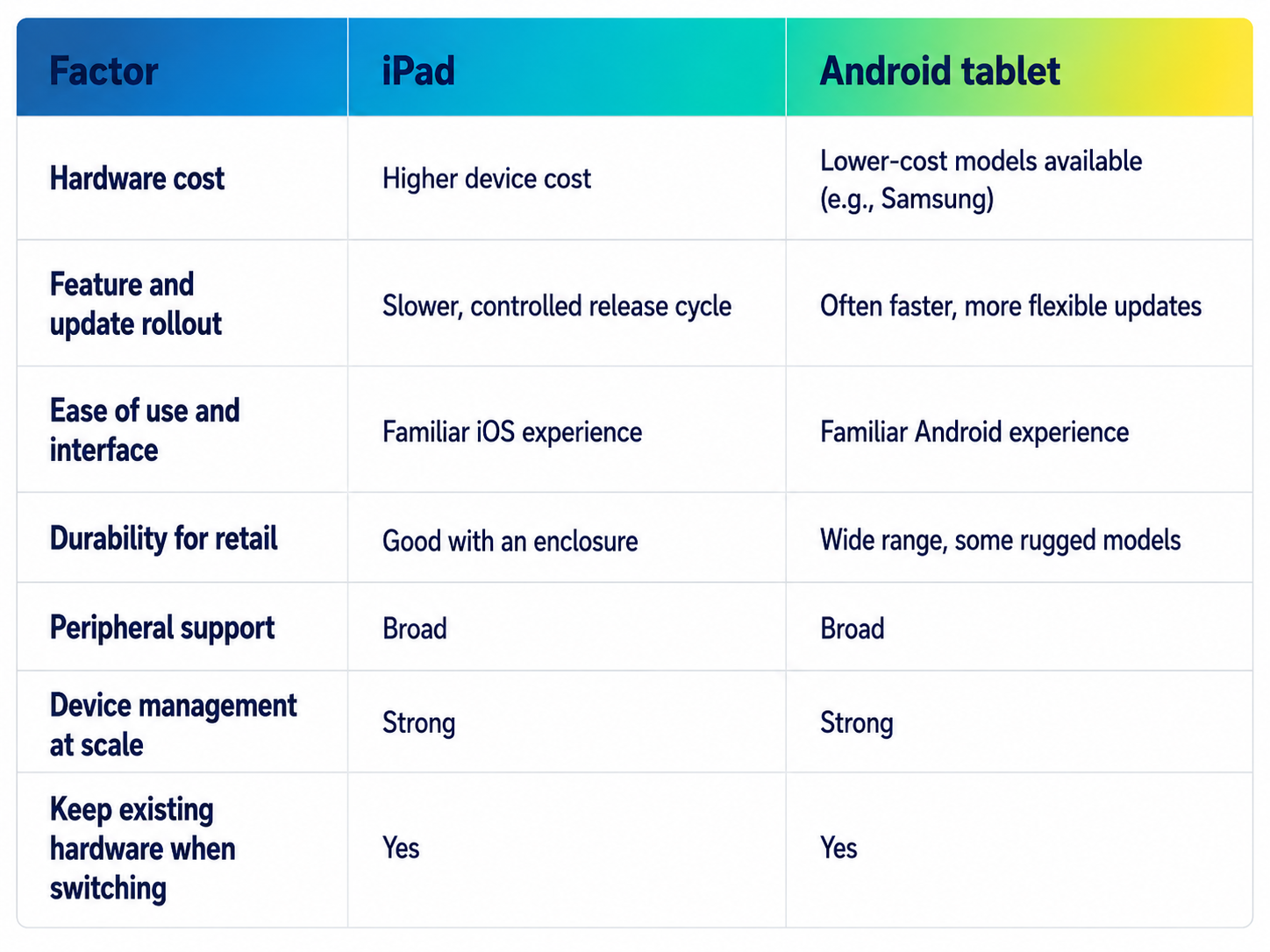
Hardware cost is usually the first differentiator operators notice. iPad devices generally carry a higher upfront cost than comparable Android tablets. Android also offers more flexibility on price point: retailers can choose from a wider range of manufacturers, including devices like Samsung's Galaxy Tab line, at a lower entry cost than Apple hardware.
Update cycles differ too. Android's more open ecosystem tends to let manufacturers and app developers ship feature updates and patches faster than Apple's more controlled release process, which can mean new POS features reaching Android devices somewhat sooner.
Interface familiarity is largely a wash. Budtenders adapt quickly to either iOS or Android; the learning curve has more to do with how the POS software is designed than which operating system runs it.
Durability, peripheral support, and device management at scale are comparable across both platforms today. Both support retail-counter enclosures and connect to barcode scanners, printers, cash drawers, and card terminals. Both platforms can also be managed centrally across a multi-location chain.
A note on Cova: Cova now supports iPad in addition to Android, which matters most for dispensary owners who don't want to buy new hardware just to change software providers. See the FAQ below for current device details.
What Features Should a Cannabis iPad POS Have?
You should filter every feature decision through one question: does this reduce compliance risk or introduce it? A fast interface matters for budtender speed, but speed without compliance controls just means a store can make mistakes faster. An iPad POS for your dispensary should include:
- Age and ID verification built into the checkout flow, not handled manually
- Purchase-limit and THC-equivalency alerts flagged before a transaction completes
- Seed-to-sale traceability integration with the retailer's state system
- Package and batch-level inventory tracking for recall readiness and audit accuracy
- Cannabis-compliant labels and receipts
- Offline mode so checkout doesn't stop during a connectivity outage
- Reporting and integrated payments that reduce manual reconciliation
- Fast product lookup so staff move quickly without cutting corners on verification
Every one of these is a software requirement; the iPad just needs to run it reliably, which most current-generation models do.
How Does Seed-to-Sale Tracking Work on an iPad POS?
Traceability comes from the POS software's connection to the state system, not the tablet running it. Whether a dispensary uses an iPad, Android tablet, or web browser, the underlying integration with Metrc or BioTrack works the same way.
When a sale completes, a properly integrated dispensary POS reports it to the state’s cannabis traceability system, either in real time or on a scheduled sync, depending on state requirements. Real-time reporting reduces the window for inventory discrepancies to go unnoticed; batch reconciliation means more room for error and more staff time catching up. Because requirements vary by state, confirm how your POS handles reporting for your market, including during an outage and once connectivity returns.
What Hardware Do You Need to Run a Dispensary POS on an iPad?
A complete iPad checkout station for a cannabis dispensary typically includes an iPad in a secure counter-mounted stand or enclosure, a barcode scanner, a receipt printer and (in most states) a compliant label printer, a cash drawer, an ID scanner, a card terminal, and reliable network connectivity with a documented fallback for outages.
Because iPad support is newer for some cannabis POS platforms, you should confirm supported models and compatible peripherals with your provider before purchasing hardware. If you’re switching platforms, verify your existing scanners, printers, and card terminals work with the new software rather than assuming universal compatibility. See How to Choose the Best POS Tablet for Your Cannabis Retail Store for a full breakdown of counter setup.
How Much Does an iPad POS Cost for a Dispensary?
Total cost breaks down into a few components: device cost (iPad hardware typically costs more upfront than a comparable Android tablet); stand, enclosure, and peripherals (scanners, printers, cash drawers, and card terminals, regardless of tablet brand); software subscription (pricing model varies by provider and store size); and setup and onboarding (catalog imports, traceability configuration, staff training).
The biggest lever for reducing cost is often not the tablet. You can significantly reduce POS migration costs by keeping your existing hardware if you’re switching POS providers.
iPad POS for Small and Multi-Location Dispensaries
Single-location operators should prioritize ease of use, a straightforward launch, and cost control over complex device management infrastructure.
Multi-location and enterprise operators face different priorities: centralized device management, consistent permissions across stores, and reporting that rolls up across locations rather than living in silos. Managing a fleet of tablets, whether iPad, Android, or a mix, becomes a bigger question as store count grows. Confirm how your POS provider supports fleet-wide updates and consolidated reporting before scaling. Take a look at our Enterprise POS page to learn more.
Which Cannabis POS Platforms Run on iPad?
Several cannabis POS platforms now support iPad alongside the Android tablets that have historically dominated dispensary counters. Comparing and reviewing these platforms is beyond the scope of this article – but the landscape is clearly shifting toward broader hardware flexibility, including at Cova.
FAQ
Does Cova run on iPad?
Yes. Cova POS supports iPad through a web-based version of its front-end application, which also runs on Android tablets and in a standard web browser. The compliance features and functionality are the same across all three.
Does Apple allow cannabis POS apps on iPad?
Apple's App Store has historically applied restrictions to apps tied to cannabis sales, which is one reason some cannabis POS providers deliver their iPad experience as a web application rather than a native App Store download. A web-based approach sidesteps App Store approval requirements and can simplify updates, since changes roll out through the browser instead of an app update cycle.
How long does it take to set up an iPad POS at a new dispensary?
Setup timelines depend on catalog size and complexity, how quickly the traceability connection to the state system can be configured, whether hardware needs to be ordered or is already on hand, and how much staff training is required. A single-location store with a straightforward catalog and existing hardware typically launches faster than a multi-location operator building out several stores at once.
How should you protect cannabis customer data on an iPad POS?
Data protection on any cannabis POS comes down to a few layers: device-level access controls per staff member, role-based permissions limiting what each employee can view or edit, encrypted data transmission between the POS and backend, and a vendor with documented security and breach-response practices. Ask your provider directly how customer and transaction data is encrypted, stored, and backed up.
Can one iPad POS handle both medical and adult-use cannabis sales?
It depends on the state and how the software is configured. Many cannabis POS platforms support dual-license stores serving both customer types, but specifics vary: purchase limits and tax treatment often differ between medical and adult-use sales, and reporting requirements may separate the two. Confirm with your provider exactly how customer type, limits, taxes, and state reporting are handled before assuming full compatibility.
The Platform Matters Less Than Compliance
Choosing between iPad and Android is a smaller decision than most operators may think. What actually determines whether a dispensary POS works is compliance coverage, reliability during high-volume days, and how well it integrates with traceability requirements. The hardware is the interface; the software does the real work.
A practical decision path may look like: confirming your market's traceability requirements, listing the compliance controls your store can't operate without, choosing iPad or Android based on existing hardware and budget, then confirming peripheral compatibility and vendor support before committing.
For dispensaries switching POS systems, Cova is built to be compliance-first, whether you're running it on Android, iPad, or in a browser, so you can change providers without giving up traceability, reliability, or purchase-limit enforcement – or the hardware you've already paid for. Book a demo today to see how Cova runs on your existing setup.