

If you’ve been running QuickBooks alongside your dispensary’s point-of-sale (POS), this likely sounds familiar: you close the register, export the day's sales, then reconcile totals that never seem to match. Multiply that across locations and every month-end close, and the manual work adds up fast. This is more than an inconvenience for cannabis retailers; under Section 280E, the accuracy of your cost of goods sold (COGS) determines what you can legally deduct, and books built on hand-keyed exports are harder to defend if the IRS asks questions.
That’s why we’re breaking down why connecting your POS to QuickBooks Online matters, how 280E changes what "accurate books" means for a cannabis retailer, the three ways to move data between systems, what actually syncs, and where Cova's QuickBooks Online integration fits.
Key Takeaways
- A connected POS eliminates manual exports, keeping sales, COGS, tax, and inventory data consistent between register and books.
- 280E makes COGS accuracy non-negotiable. Cannabis retailers can't deduct most ordinary expenses, so COGS is one of the few levers you have – and it needs to hold up to scrutiny.
- A one-way sync protects your books. Data flows from POS to QuickBooks Online, never the reverse, so a bookkeeper's work never gets overwritten.
- Cova posts sales, COGS, taxes, inventory, and POs into QuickBooks Online on a schedule, through a certified connector, with every entry validated and logged.
Why Should a Dispensary Connect its POS to QuickBooks?
A connected POS turns reconciliation from a manual chore into something that runs in the background. Instead of exporting a spreadsheet and re-keying totals, the numbers post automatically after close, already mapped to the right accounts. The benefits of this setup include:
- Time saved. Your bookkeeper no longer has to worry about daily spreadsheet reconciliation.
- Fewer errors. Manual re-keying is where numbers get transposed and categories get missed.
- An audit trail. Every synced transaction is logged and traceable back to its QuickBooks entry.
- Consistency. POS sales, eCommerce orders, and the general ledger all show the same numbers.
Retailers running disconnected systems repeatedly hit the same wall: sales that don't match the bank deposit, inventory values that differ from the shelf count, and a bookkeeper chasing discrepancies instead of analyzing the business.
What Is 280E and How Does it Change Dispensary Bookkeeping?
Section 280E of the federal tax code blocks cannabis businesses from deducting ordinary operating expenses like rent, marketing, and most payroll. The one major exception is cost of goods sold, which is why COGS accuracy carries more weight for a dispensary than for almost any other retail business.
In practice, that means:
- COGS needs to be recorded at the item level, not estimated, so the number claimed on a return is defensible.
- Inventory costs must stay separated from non-deductible expenses in QuickBooks Online.
- Compliance reporting should tie back to your POS and seed-to-sale system, so books, register, and filings agree.
A POS-driven sync that captures item-level COGS as each sale happens puts an operator in a stronger position than one built on periodic estimates. This is a supporting piece of the 280E picture, not the full story; Cova's guide to cannabis tax laws and planning covers the broader compliance landscape. (This isn't tax advice, and any 280E treatment should be confirmed with a cannabis CPA.)
How Do You Sync Dispensary Sales to QuickBooks Online?
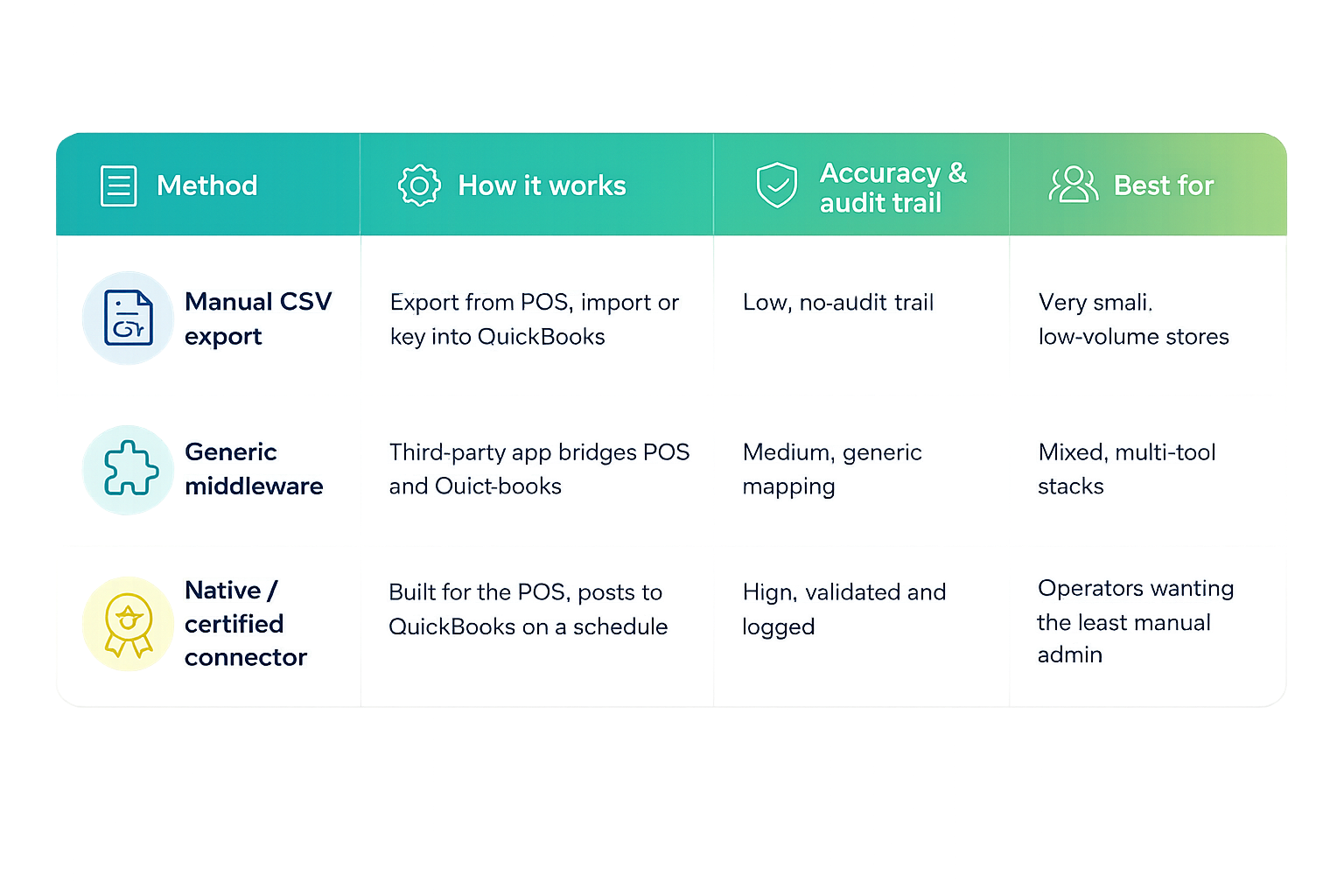
A sync pushes sales, COGS, taxes, and inventory changes from the POS into QuickBooks Online, typically on a schedule after close, with each figure mapped to a general ledger account. Operators generally do this in one of three ways: manual export (pulling a report from the POS and keying it into QuickBooks Online), generic middleware (a third-party automation tool bridging the two systems), or a native connector (software built specifically for the POS that posts validated entries on a schedule).
Whichever method you choose, the sync should run one way: from the POS into QuickBooks Online – never the reverse. That protects a bookkeeper's work from being overwritten and keeps the POS as the single source of truth for what happened at the register.
What Dispensary Data Syncs, and How Does it Map to Your Chart of Accounts?
A complete sync moves five categories of data: sales, COGS, taxes, inventory, and purchase orders, each mapped to a corresponding account. Operators typically choose between a daily sales summary (one consolidated entry per day, which is well-suited to smaller, single-location stores) and per-transaction detail (every sale posted individually, which is more useful for multi-location operators who want to drill into specific transactions later).
Payment types matter, too. Cash, debit, and card sales should each map to their own account so bank deposits reconcile cleanly against what the POS recorded, instead of landing in one undifferentiated revenue bucket. None of this works without a clean, cannabis-appropriate chart of accounts in place first; the integrity of the data sync depends on the accounts it's mapping into.
Manual Export vs. Middleware vs. Native Connector: Which Method Fits?
Manually exporting your data costs nothing beyond staff time – but that time adds up, leaves no audit trail, and is more prone to reporting errors. Generic middleware automates the handoff but relies on generic field mapping, not cannabis-specific logic. A native connector validates entries before posting and logs every sync, which is the standard to work toward as your sales volume grows.
How Does Cova's QuickBooks Online Integration Work?
Cova's dispensary POS connects to QuickBooks Online through TendTech Connect, a certified Intuit and Cova partner. The sync runs one way, using your existing GL accounts and validating GL codes before anything posts, with every sync logged. In practice, that means:
- A full accounting entry posts automatically once the day's sales close.
- A purchase order in Cova becomes a Bill in QuickBooks Online.
- Multi-store inventory values rebalance per location.
- An accountant managing several dispensary clients works from one dashboard, with each sync independently traceable.
Cova functions as the source of truth feeding QuickBooks Online and the rest of your retail stack, rather than one more system to reconcile by hand. Several cannabis POS platforms offer some form of QuickBooks connector, and you should evaluate any option against the same standard: a one-way sync, GL-code validation before posting, per-location inventory and reporting, an audit log, and certification proven on cannabis-specific data.
You can see the full list of connected tools on Cova's integrations page.
How Do You Set Up a Dispensary QuickBooks Sync?
- Confirm your QuickBooks Online plan – you need Plus or Advanced for consolidated multi-location reporting.
- Set up or confirm your chart of accounts, including cannabis-appropriate COGS categories.
- Connect Cova and QuickBooks Online.
- Map sales, COGS, taxes, inventory, payment types, and POs to the correct GL accounts.
- Run a test sync and validate the GL codes.
- Go live and set your posting schedule.
FAQ
Can you use QuickBooks for a cannabis business?
Yes. QuickBooks Online is widely used by dispensaries, and legality isn't the issue. The work is recording sales and COGS accurately at the item level and separating non-deductible expenses so the books reflect what 280E allows.
Does the integration work with QuickBooks Desktop or only QuickBooks Online?
Cova's integration, delivered through TendTech Connect, works with QuickBooks Online. Dispensaries running QuickBooks Desktop would need a different option, since sync architecture and API access differ significantly between the two versions.
Do you still need specialized cannabis accounting software if you use QuickBooks?
Many retailers run QuickBooks Online alongside a POS connector instead of a separate cannabis accounting platform, and that’s usually sufficient for single or few-location operators. A dedicated tool or CPA firm tends to earn its cost once an operator scales into multiple states, entities, or an MSO structure.
The Bottom Line
Syncing POS sales to QuickBooks Online isn't just an efficiency play. It keeps the COGS numbers behind your 280E position accurate and defensible, without a bookkeeper re-keying totals every day. Cova's QuickBooks Online integration, delivered through the certified TendTech Connect partnership, handles this automatically, posting validated sales, COGS, tax, and inventory entries on a schedule. To see exactly how it fits your dispensary operation, book a free demo today.