PRODUCT UPDATES
🚚 No More Double Entry with Metrc Transfer
Transfers just got way less painful. Instead of typing everything twice (once in Cova, once in Metrc), our new Metrc Transfer feature does the heavy lifting for you. Package IDs and weights sync automatically, so you can process transfers in one click, with fewer errors and more time back in your day. Faster, easier, done.
Learn more about Creating Metrc Transfers.
🔎 New: POS Filtering in Beta
Finding the right product in your POS just got simpler. In Cova v1.32, you can now filter by Price, Net Weight, THC, and CBD—and stack it with sorting for even smoother workflows. Just install the update, toggle on Beta Features in Settings, and give it a spin. (Rolling out now, so if you don’t see it yet, it’s on the way!)
See the docs for more details, and let us know what you think after you’ve given it a try.

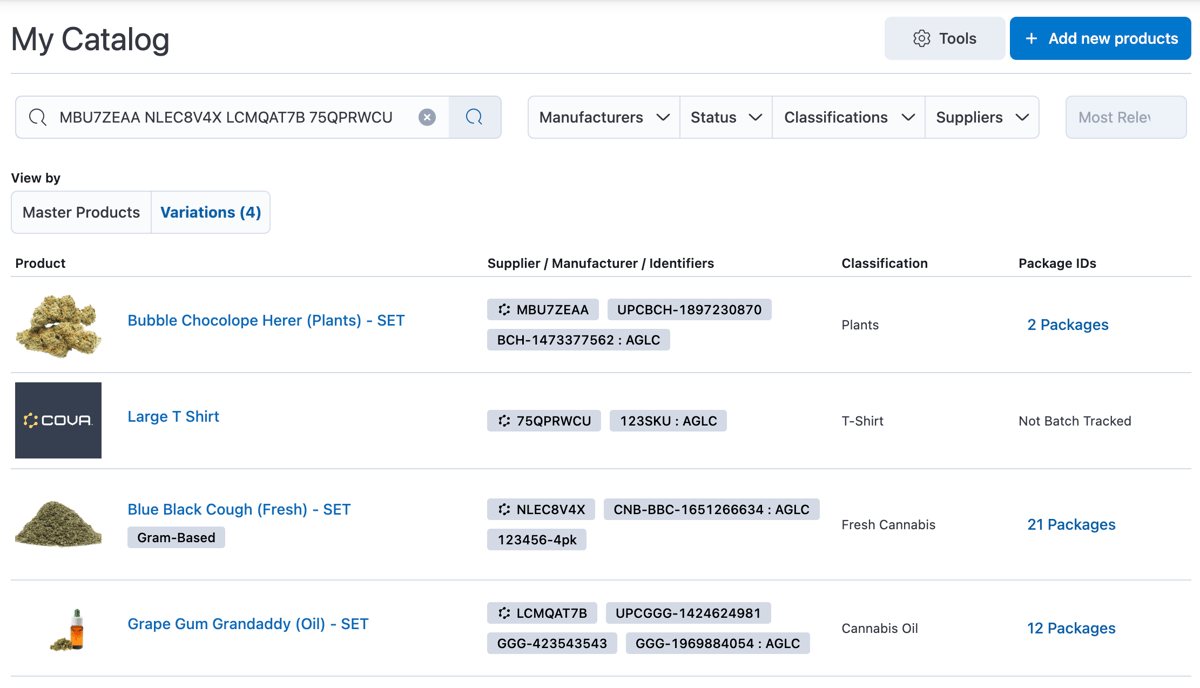
📦 See More Product Details with the New Catalog (Beta)
Your product catalog just got smarter. With our new Catalog (Beta), you can view more details at a glance (like supplier and manufacturer SKUs, UPCs, product status, and classifications) right in the product list. You can even click straight into variations and packages.
It’s available now alongside Catalog (Classic) while we keep refining the experience. Give it a try and let us know what you think!
💾 Cannabinoid Choices Saved in Receiving
Less clicking, same flexibility. Now when you’re receiving products, your cannabinoid selections (like THCa or CBG) are saved and visible for next time. This works in both purchase orders and manifests, so repetitive tasks get a little easier.
We’ve also made small quality-of-life tweaks, like improving keyboard tab order in purchase orders. These changes were driven by your feedback in Hub, so keep it coming.
🛒 Manage Your Cova eComm in Hub
No more jumping between platforms—you can now manage your Cova eCommerce right inside Hub. Centralized, simple, and streamlined.
Here’s what you can do:
- Add and link your logo
- Customize typography & brand colors
- Update Privacy Policy & Terms
- Define product classifications
- Set order notification emails
- Build homepage carousels & messaging
- Set up delivery options
👉 Learn how to set it up

💳 Cova Pay Canada Turns 2! 🎉
Two years, over 6 million transactions, hundreds of happy retailers, and countless positive reviews—we couldn’t have done it without you. But we’re not stopping here. Our mission is to make Cova Pay the best cannabis payment solution in the industry.
👉 Help us get there! Share your experience in a quick 2-minute survey and shape the future of Cova Pay. Take the Survey.
DID YOU KNOW?
📊 Your Most-Used Dashboard Is...
The End of Day Dashboard is hands-down the most popular dashboard in Cova—and for good reason. Retailers tell us it’s their go-to tool for keeping daily ops smooth and stress-free.
Here’s why teams love it:
- Clear snapshot of sales and performance at a glance
- Easy cash flow tracking and faster reconciliation
- Fewer errors and less time wasted at closing
Pro Tips to Get More Out of It:
- 📱 Take it mobile—your dashboard goes wherever you go
- 🔄 Compare performance by location and employee in seconds
- 🛍️ Review top-selling products and leading brands to see what’s moving
- 📦 Keep an eye on inventory stock value without digging through reports
- 🔎 Spot trends early by checking your dashboard daily
SUPPORT UPDATES
💙 Showing Our Support Some Love
At Cova, our support team isn’t just answering questions—they’re powering your success. With years of cannabis industry experience (many of our specialists have been here 7+ years!), they’re known for patience, knowledge, and going the extra mile.
If our team has made your day a little easier, we’d love for you to share the love. Your feedback on G2 helps us grow and helps other retailers find the right partner.
👉 Leave Us a Review on G2
📅 Upcoming Webinars
Rooms / Labels / Inventory Manager
Wednesday, September 24, 2025 from 12:00 pm – 1:00 pm MDT (2:00 pm – 3:00 pm EDT)
Wednesday, October 22, 2025 from 12:00 pm - 1:00 pm MDT (2:00 pm - 3:00 pm EDT)
Metrc Essentials (US Metrc States)
Wednesday, October 1, 2025 from 12:00 pm - 1:00 pm MDT (2:00 pm - 3:00 pm EDT)
Inventory Counts
|


